Baby Blue Digital Paper Set for Creative Projects
Finding the perfect background texture can often be the difference between a design that feels flat and one that truly pops. Whether you are assembling a digital scrapbook layout, designing an invitation for a new arrival, or creating social media graphics for a small business, the foundation of your project matters. This is where a curated collection like the Baby Blue Digital Paper Set becomes an invaluable resource. It offers a versatile palette of soft, calming hues that work seamlessly across a wide range of creative endeavors, providing a professional finish without the need for complex design skills.
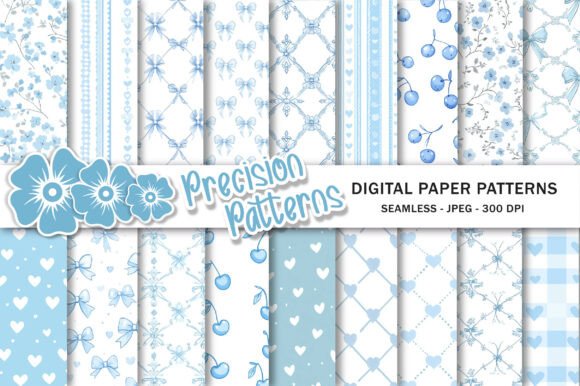
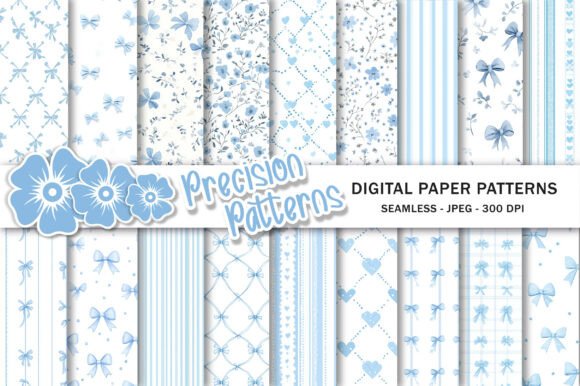
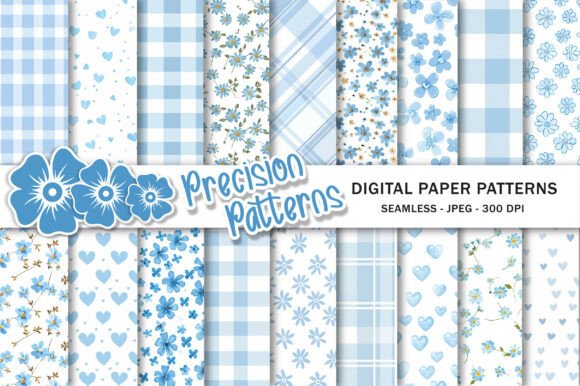
At its core, this collection consists of 18 unique digital papers, each crafted to provide distinct textures and patterns while maintaining a cohesive color story. The specific choice of baby blue is intentional; it evokes feelings of tranquility, trust, and freshness. These qualities make it an excellent choice for projects related to weddings, birthdays, and especially birth announcements. Unlike solid color fills that can look sterile on a screen, these digital papers often include subtle gradients, watercolor effects, or gentle geometric patterns that add depth and visual interest to your work.
High-Quality Specifications for Professional Results
One of the most common frustrations for creators, particularly those new to digital design, is encountering low-resolution images that become pixelated when printed or resized. This set addresses that issue directly by providing files in JPEG format with a robust resolution of 300 dpi (dots per inch). This is the industry standard for high-quality printing, ensuring that whether you are printing a single card at home or running a bulk order through a professional service, the output remains crisp and clear.
Each paper in the collection measures 12″ x 12″, a classic size that aligns perfectly with traditional scrapbooking standards. However, the utility of these files extends far beyond that specific dimension. Because they are digital assets, they are incredibly easy to resize using various software programs. Whether you need a tiny square for an Instagram post, a wide banner for a website header, or a custom-sized background for a presentation slide, these files can be scaled up or down without losing their integrity. This flexibility makes them suitable for both print and digital-only applications.
Versatile Applications for Creators and Entrepreneurs
The true value of the Baby Blue Digital Paper Set lies in its adaptability. It is not limited to a single type of user or project. Here are several practical ways different individuals can leverage these assets:
- Scrapbooking and Memory Keeping: For hobbyists documenting family milestones, these papers serve as perfect backgrounds for photo mats and journaling cards. The soft blue tones complement photos of babies, beach vacations, or spring events beautifully.
- Event Planning and Invitations: If you are designing invitations for a baby shower, a boy's first birthday, or a gender reveal party, these textures provide an instant thematic backdrop. They eliminate the need to create a pattern from scratch, saving hours of design time.
- Digital Marketing and Social Media: Small business owners and marketers can use these backgrounds to create consistent branding for social media banners, story highlights, or promotional posts. The clean aesthetic helps text overlays stand out, improving readability and engagement.
- Web and Blog Design: Bloggers looking to refresh their site's visual identity can use these papers as section dividers, sidebar backgrounds, or featured image templates. They add a touch of personality without overwhelming the written content.
- Product Packaging and Labels: Entrepreneurs selling handmade goods, such as soaps, candles, or baked goods, can incorporate these designs into their packaging labels or thank-you cards to enhance the unboxing experience.
- Planner Stickers and Organization: Fans of digital planning can crop elements from these papers to create custom stickers, washi tape strips, or dashboard backgrounds for apps like GoodNotes or Notability.
Why Choose Digital Over Physical?
In an era where physical crafting supplies can be expensive and take up significant storage space, digital papers offer a streamlined alternative. When you purchase this set, you receive an immediate download after purchase. There is no waiting for shipping, no risk of damage during transit, and no physical product to store. Once downloaded, the files are yours to use repeatedly. You never run out of a specific pattern, and you can print only the exact amount you need for a project, reducing waste.
Furthermore, the ability to manipulate these files digitally opens up creative possibilities that physical paper cannot match. You can layer multiple sheets with different opacity levels in software like Photoshop, Canva, or Procreate to create entirely new composite backgrounds. You can clip photos into the shapes of the patterns or use blending modes to change the mood of the texture. For educators creating classroom materials or worksheets, this means you can generate endless variations of handouts that look professionally designed rather than generic.
Important Considerations Before You Start
While working with digital assets is generally straightforward, there are a few practical things to keep in mind to ensure the best results. First, always verify the license terms associated with your download. While most sets like this allow for personal and commercial use, it is good practice to confirm if there are any restrictions on reselling the files "as is." Typically, you are encouraged to incorporate the papers into a larger design (like a finished invitation or a printed book) rather than selling the raw JPEG files themselves.
Secondly, consider your software capabilities. While the prompt notes that the files are easy to resize with different software, having a basic understanding of your chosen tool will help. Free tools like Canva are excellent for beginners who want to drag and drop these backgrounds into pre-made templates. More advanced users might prefer Adobe Illustrator or Affinity Designer for precise control over vector elements layered on top of these raster images. Regardless of the tool, remember that scaling an image up significantly beyond its original 12x12 dimensions can eventually lead to quality loss, so try to keep your resizing within reasonable limits for the best 300 dpi output.
Finally, think about color consistency. Screens display colors differently depending on the monitor calibration, and printers interpret ink uniquely based on the paper stock used. If color matching is critical for a brand project, it is advisable to print a test sheet on the actual material you intend to use before committing to a large run. The "baby blue" hue may appear slightly cooler or warmer depending on your specific setup, but the high resolution ensures that the detail remains sharp regardless of these slight tonal shifts.
Ultimately, integrating a Baby Blue Digital Paper Set into your workflow is about efficiency and aesthetics. It provides a reliable, high-quality foundation that allows you to focus on the creative aspects of your project—such as layout, typography, and messaging—rather than worrying about background textures. Whether you are a freelancer pitching a new client, a parent making a birthday card, or a teacher preparing lesson plans, these 18 unique designs offer the versatility and professionalism needed to elevate your work. By following the creator to discover more awesome artwork, you can continue to build a library of resources that keeps your projects fresh and engaging.